Sunday, August 22, 2010

Trauma Team

The DS has played host to quite a variety of games, many of which let you play as characters from a variety of professions.  The Phoenix Wright series lets you play as a lawyer.  Cooking Mama makes housework fun.  Nintendogs gives you insight into owning a pet.  And the Trauma Center puts players in the shoes of medical professionals so talented they're just about superhuman.

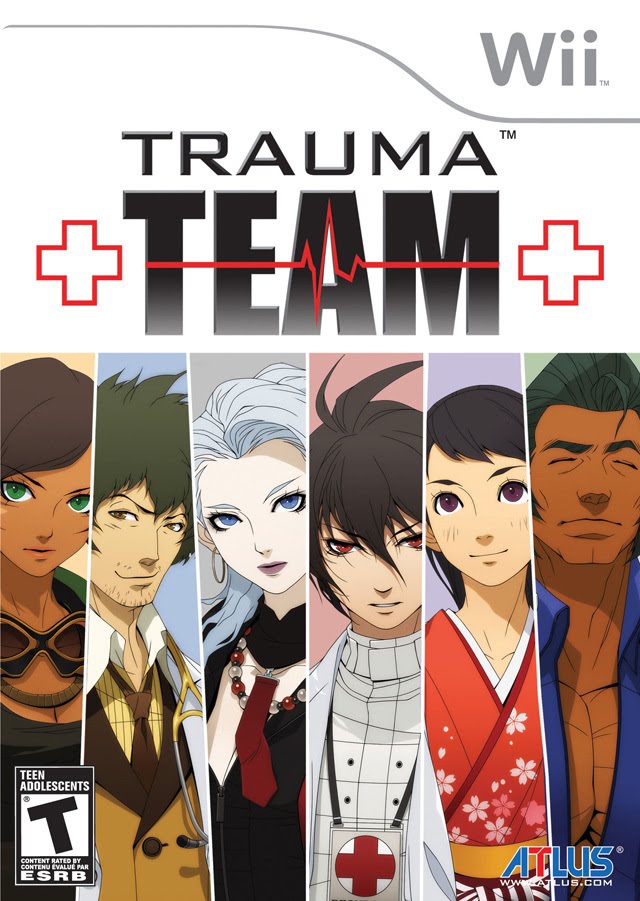
Though its based on the DS, Trauma Team is the series' second foray on the Wii.  You play as six different doctors, each of which handle various steps of the treatment process.

Looking at the box art, let's start on the very left.  We have Maria Torres, who is basically an EMT.  She provides First Response, which means on-site treatment to stabilize patients so they don't die before they make it to the hospital.  She's loud, rude, and impulsive, but she has the skills to back up her claims.  However, even as talented as she is, Maria doesn't believe in the power of teamwork, and is quick to shove away any help from others when treating patients.

Next is Gabe Cunningham, a diagnostician.  He exams patients through various methods, including visual exams, questioning, and X-Ray to diagnose them with a disease, based on the symptoms they exhibit.  Put simply, Gabe's the one who finds out what's wrong with the patient, so that the other doctors know how to treat him/her.  Gabe is laid-back and crude, but is very good at what he does.  He tends to put his job before his personal life, though.

Next is Naomi Kishimura, a medical examiner.  Her role is close to that of a detective, with corpses being delivered to her office, and her job being to illustrate how that person died (and in many cases, why).  She has the ability to hear the dead person's last words through her cell phone, which has gained her the title "Corpse Whisperer" in the tabloids.  Her skill in forensics and reasoning has led to the FBI often working closely with her to solve difficult cases.  Naomi isn't bothered in the slightest by death, and can be cold and distant with others, but even she has a soft side that shows every now and then.

Moving on, we have CR-S01.  He's been in maximum security prison, serving a 250-year sentence for a bioterrorism attack he was convicted for some time ago.  As a side-effect of the gas, he gained amnesia, forgetting everything except for his amazing medical talent.  Because he can't remember his name, he's referred to by his prison number, or "kiddo" by the other doctors.  Given his personality and skill at helping people, nobody, including the very man who arrested him, seems to believe he carried out that attack.  Brought in as a specialist, he is given a chance to reduce his sentence by performing difficult operations, and also in the hopes that letting him take up the scalpel once more will help him regain his memories.  As someone still struggling to identify himself, CR-S01 is quiet, and distant with others.  He is calm, collected and logical, and performs surgical operations at what is believed to be near-superhuman speed and precision.  He is often criticized for lacking passion, though.

Second from the right is Tomoe Tachibana, the heir to the Tachibana group, a rich and powerful family in Japan.  Bad relations with her father led her to leave Japan and pursue her own ambitions in America.  Tomoe is an endoscopic surgeon, meaning she uses an endoscope to treat patients from the inside.  This means you'll control the endoscope directly, traveling through organs to repair any complications observed, such as tumors, excess blood, and hemorrhaging.  Tomoe is determined, and dedicated to her profession, such to the point that she ordered own personal endoscope, built from the ground up to her specifications.  Like CR-S01 though, she often wonders if she really belongs among the friends she's made at Resurgam Hospital, and sometimes has trouble fitting in.

Finally, we have Hank Freebird.  Hank is an orthopedic surgeon at Resurgam Hospital by day, and the superhero Captain Eagle by night.  As Captain Eagle, Hank has superhuman strength and durability, and the ability to fly, though he deals with the typical growing pains all heroes deal with, such as public misunderstanding, and late appointments.  As an orthopedic surgeon, Hank works primarily with bones.  Got a dislocated bone?  Fractured bone?  Shattered bone?  Dr. Freebird's your guy.  Hank maintains a positive outlook on life, and believes in humanity.  Many would call him an idealist.

Trauma Team's story is split between two parts.  Initially, you'll have access to each doctor's story path, composed of several missions.  You can progress through each path at your leisure, switching to another character after every mission if you'd like.  In fact, many of the missions run parallel to each other, so mixing things up may be the best way to absorb the initial plot in a cohesive manner.  However, these stories serve more as character development story arcs, with the grand plot only being hinted at.

Finishing each doctor's story path will unlock access to the Finale.  This is when the plot really starts to move, and all the pieces that you've uncovered through the initial paths fall into place.  The Finale is composed of 12 missions, composed of gameplay from all of the doctors.

Cutscenes are presented in the style of a comic book, with character sprites, speech bubbles, and limited animation.  However, the game puts what little movement shown to effective use, with sound effects and full voicing for all the characters, allowing me to easily imagine a more realistic scene in my head (wierd as that may sound..).  Surgical operations use 3D graphics, but it's not anything to write home about (it is on the Wii, after all).

My primary concern when I tried Trauma Team, however, was how well the controls would work.  After all, in a surgical operation, precision is key!  And I'm happy to say that, for the most part they don't get in the way.  The game makes fair use of all the Wii remote's functions, incuding the mic and accelerometer.  For general and orthopedic surgery, the IR sensor isn't as steady as I would like, but the developers apparently realized this, because the game is pretty forgiving, without sacrificing difficulty.  Most motion gestures are simple, but the controls for Tomoe's endoscope, while hardly unusable, are probably the low point of the game in terms of controls.

Trauma Team didn't seem to get much press or attention when it released, but I for one was pleasantly surprised by its quality.  The plot takes some time get moving, but that shouldn't be mistaken for poor pacing.  The gameplay is fun, and I actually learned a few tidbits about the medical profession from playing (like for example how much of a team activity surgery is)!  Simply put, you'll probably have a good time playing Trauma Team.  An 8.5/10

Saturday, August 14, 2010

Sonic and Sega All-Stars Racing

After being somewhat disappointed to Modnation Racers' lack of what I believe to be true kart-racing spirit, I looked to the next best thing: Sonic and Sega All-Stars Racing.  Now, at first glance this really does come off as a cheap cash-in on Sega's various franchises and characters.  Which is why I partially ignored it when it first came out, instead looking forward to Modnation Racers for my kart racing fix.

Anyway, it seems I was wrong to do that.  Is Sonic and Sega All-Stars worth $50-60?  I don't think I would buy it at that price.  Is it a good game?  Yes.

The whole thing that makes this game great is how straightforward and relatively simple it is.  In other words, precisely how a kart racing game should be.  There's no apparent story; just a few modes to jump into, each packed with gameplay content.

The main mode is the Grand Prix, which is separated into several cups, which in turn are each separated into several races.  Each finishing position (1st, 2nd, etc.) is assigned a point value.  The higher the position, the more points you get.  The racer with the most points at the end of the cup wins.  You'll be no stranger to this system if you've played any racing game ever.

Next is Mission Mode, which is probably designed to introduce you to various characters and play styles.  As it's name would suggest, you are assigned a character, a task, and usually a time limit to complete that task.  Maybe you'll be cruising through a stage as Beat, trying to pull off as many tricks as possible.  Maybe you'll be collecting rings as Sonic, or even participating in mini-race cups as certain characters.  There's over 60 missions total, if memory serves, so there's plenty to return to here.  Additionally, your performance in each mission is ranked (just like in most Sonic games).

Also present is Time Trial mode.  The game ships with a staff ghost (basically a preset time) for each stage, and there's also local and online leaderboards showcasing the best times.  Speaking of online support, this game features a very healthy suite of multiplayer options.  In addition to local 4-player, there's 2-player splitscreen online, and 12 player online racing available.  You can either play with strangers or set up games with friends.

Participating in any of these various play options nets you varying amounts of Sega Miles, which act as a currency you can spend in the shop to unlock more stages, characters, and even music tracks to race to.  The game is packed with characters, locales and other things from Sega's past, including the major Sonic cast, the Bonanza Bros, Billy Hatcher, and even Shenmue and Alex Kidd.  I for one was pleasantly surprised to find Can You Feel the Sunshine (a song from Sonic R) as an available track to be unlocked.  You can view detailed information on every unlocked stage and character in the Collections menu, which is a cool addition if you're looking to learn a little bit about gaming history.

I'd say Sega nailed the spirit of kart racing in this game.  There's a simple balance between the use of skill and items, with a proper slice of both being essential to grab victory.  Just as in any and every other arcade racer out there, drifting is also an important skill, and one you'll probably find yourself forced to use near-constantly to stay on top.  Overall, gameplay is fluid, and feels just right.

The game also runs pretty well with no dips in framerate, glitches, or particularly long load times to speak of, and the graphics aren't bad.  Nothing special, but I don't think anyone will find vault with the game's visuals.

Put simply, Sonic and Sega All-Stars is Sega's answer to Mario Kart.  It's not innovative, inventive, or even particularly standout in terms of quality.  But if you're looking for a decent time, this is most definitely a viable replacement for Nintendo's venerable series.  An 8.0/10.

Wednesday, August 4, 2010

New computer! Macbook Pro 15" laptop

So, having worked all summer, I finally worked up enough cash to buy myself a brand-spanking-new Macbook Pro from Apple. I'd been eying one for a couple years now, and man was it exciting to be able to finally have a computer to totally call my own. I bought the baseline 15" model, with a 2.4ghz CPU, 4gb of DDR3 RAM clocked at 1066mhz, and the other base settings (glossy 1440x900 screen, etc.). It was just over $1,600 from Amazon.

-Form Factor

I've always liked the way Apple engineers their products, and this is no different. The computer is silver and black, made primarily out of aluminum (casing), glass (screen, trackpad, apple sign), and some type of durable plastic (keys, hinge), excluding the internal parts.

Though I'm certainly not going to drop it intentionally, the casing feels sturdy and durable. It also emanates an aura of precision. All of the ports and edges are sharply carved, and the keys sit snug in their places. The speakers on either side of the keyboard consist of extremely small holes; so small that you can't really tell the difference between the speakers and the regular casing by running your finger over it.

The trackpad feels (and is reportedly) composed of glass. It feels extremely smooth to the touch, and is overall easy to use. Rather than include a separate button, Apple made most of the entire pad pushable to use as one button. This takes some getting used to, especially if you're used to pushing a separate button, but it works well with some practice. Actually, only about 75-80% of the trackpad is really effective as button. It seems to have been made to slant down when you push it, so you can't actually press down on the top. Still, after getting used to this approach, it's actually a bit uncomfortable to use other trackpads that have a separate button.

On the right side of computer, you have your ports. From the top down, you have a magnetic charging port, ethernet, FireWire 800, MiniDisplay Port, 2x USB, an SD Card Slot, Audio out, and Audio in. I do have some disappointments with this. First, only two USB ports? It's not horrible, but I think Apple could have put at least one more in. Second, while I very much appreciate the addition of an SD card slot, I kinda wish I didn't have to trade the ExpressCard slot (exclusive to the 17") for it. My third hiccup was lack of a Firewire 400 port. I've been using a 250GB Lacie external drive for many of my important files, and it only uses Firewire 400. It's not a big deal, since an adapter is inexpensive, but still something I found worth mentioning. Finally you also have the batter indicator lights, which have been relocated from the bottom of the computer. They come in more handy than you might think. On the right side, you have the SuperDrive disc drive, and a Kensington lock slot.

Aside from the thumbscoop, the front is mostly bare, save for the infrared port (presumably for remotes). Speaking of the thumbscoop, attempting to open the computer makes it quickly apparent that, instead of a simple latch, the computer is kept closed with the use of what is probably an internal magnet. The sleep light (which gently pulsates when the computer is asleep) is present as well, but you can't see it unless it's on. If you've seen the indicator light on Apple's wireless keyboard, its the same deal here.

One of my favorite aspects of the physical design has proven to be the screen. It's an LED LCD screen made out of glass, so the color simply pops out. Basically, the screen is gorgeous, and looking at it is a pleasure. The view is enclosed within a black border that also has the built-in iSight Camera at the top. Naturally it blends in well. Like on the iMac, a green light comes on when the camera is active. Incidentally, the keyboard is fully backlit.

-Performance

I looked at a few benchmarks before I made the purchase, and was surprised to find that, overall this i5 processor is faster than the 2.8ghz Core 2 Duo present in the predecessor's higher end model. It shows. This laptop is quite zippy, with very little lag (if any) to be found while doing day to day activities such as web browsing, file browsing, and opening programs. From the time you press the power button, it's ready to use in about 40-45 seconds, if you bypass the login option (in which case it's even faster). It's also responsive when transitioning from and into sleep mode, going to sleep quickly after closing the shell, and waking up immediately after opening it. For only mild usage, the system usually doesn't go over 2GB of RAM usage (out of the 4 installed).

The battery is rated for 8-9 hours. That's a bit of a stretch. At mid brightness, mild usage (web browsing, document editing, music playing, etc.) will probably get you 5-6 hours. Seven, if you're good. At full brightness, you lose about an hour. I'm sure you could get 9 hours if you put it at the lowest brightness setting and just played music or typed a document (and turned off Airport and Bluetooth), but it would be a little tight. Basically, if the display is on, you lose at least 2-3 hours off of the rated charge. Still, 5-6 hours is a full evening of use, which is fine by me.

Operating System

This computer came with Mac OS 10.6 Snow Leopard pre-installed, as well as a suite of iLife applications. In true Apple fashion, the OS works closely with the hardware to produce a more efficiently running computer. There's often multiple ways to get something done, which means you always have options. For example, finger gestures open up a world of possibilities. You could, for example, right-click the classic way by holding down control, or you could just click while holding two fingers. You could use the arrow keys or on-screen buttons to maneuver through selections, or you could swipe with three fingers to navigate. You could four-finger swipe to switch between applications, or you could set up Expose to show all your open windows (a surprisingly handy feature, and choose the one you need.

I've also noticed that the Mac OS seems to accomplish certain things much faster than PCs. File transfers to external devices, while taking a fair amount of time on my PC (which is much faster than my Macbook, to be fair) running Windows 7, rarely take longer than a couple seconds on Mac. Whether this is a hardware or software boon (or, in Apple's case, a special combination of both), I don't know. Also, both Airport Extreme and Bluetooth operate very fast, and reliably. Airport connects quickly, and has actually made some progress in renewing my confidence in Wifi (which I tend to dislike).

Mostly carried over from 10.5, Snow Leopard comes packing a lot of little features that add up to a very intuitive experience. The Dashboard serves as a home to many little widgets (not unlike sidebar apps in Windows 7, or just simple apps that you'd find on a smartphone or iPhone) that you can install. You can set up a feature called Expose, which can map certain system actions (screen saver, show desktop, etc.) to corners of the screen, triggered when you put your cursor in the designated screen corner.

If I had to pick three features of the OS that really stand out to me, it would probably be Quick Look, the Dock, and the way the system handles application files. I'll start with Quick Look, which is a really handy way to quickly preview common files without actually opening any programs. For music and videos, this would mean immediate playback in a small window that pops up. For pictures, of course it would be a simple view window. Files that don't have more extensive access can instead have their general specs shown, such as date created, and file size.

The Dock is a versatile feature. You can put folder shortcuts on it, and many programs that support it change their icons under certain circumstances to give you quick information. For example, Chrome and Safari both show download progress on their Dock icons when relevant. iCal shows the current date and month. Activity Monitor can be customized to show various system monitors, such as CPU or HDD activity.

Application files are handled a little differently on Macs, compared to Windows PCs. As anyone moderately experienced with Windows knows, somewhere on your primary drive, all of your programs store their files in one large directory which is named "Program Files" by default. When you uninstall a program, it usually deletes the program's folder in the "Program Files" folder (which contains the files necessary for the program to run). However, there are often some traces left behind. With Macs, the entire program is downloaded as a package. To the average person, it looks like you're just downloading the program's icon. But you can right-click to access the "icon"'s program files. This is why, when installing a new program, all you have to do is drag the icon to the Applications folder. Because the icon IS the program, complete with all necessary program files. By the same vein, you can uninstall a program by deleting the icon (moving it to the trash). It's surprisingly simple. Still, programs can leave traces too, particularly those that require external plugins, or make use of file caches. Most of these "external" program files can be found in the Library folder, though.

Monday, August 2, 2010

Critter Crunch


I'm not normally into puzzle games. They do say that there's something about solving puzzles that releases a pleasure chemical in the human brain, but still. While it commanded my respect while I watch it in development, honestly the only reason I picked up Critter Crunch was because it was free (me being a PS+ member and all). It took me getting this chance to play it for essentially nothing that made me see, however, this title is more than worth its normal price of admission.

Critter Crunch is, like many typical puzzle games, an imaginative take on Tetris. The narrative is provided by a quirky explorer who is researching the ecosystem of a certain island inhabited by Biggs, a round furry animal with a hearty appetite. You play as Biggs as he travels across the island feeding on various critters as a part of the natural food chain.

Each level challenges you to fill Biggs' hunger bar to completion by eating jewels. The critters slowly descend down a set a vines, and your job is to prey on them before they reach the bottom and dogpile Biggs. You do this by exploiting the food chain, feeding smaller critters to larger ones until they pop open, dropping tasty jewels for Biggs to eat.

You can also go for score chains by popping open multiple critters at once. For example, popping one critter will cause any others sitting beside it (that are the same color) to also pop, just like in Tetris. Also, feeding a small critter to medium critter that is sitting right below a large critter will cause the larger critter to immediately snatch up the medium critter, resulting in a "food chain" bonus. Popping eight or more critters in one chain summons Smalls, Biggs' son. Once Smalls arrives, you can feed him for a pretty big bonus, but feeding him also causes the critters to descend faster.

It isn't long before quite a few monkey wrenches are thrown into the formula. These come in the form of special critters, and power-ups. Occasionally, you'll come across critters that are glowing. Popping these fellas will reveal power-ups, of which there are a fair bit. Garlic lets you move the entire hoard of critters up one row, giving you a bit of breathing space. Watermelon seeds let you immediately pop critters without having to feed them; great for killing off particularly troublesome critters. The spray can recolors all the critters to matching colors, setting them up for potentially huge chains.

In addition, you'll also encounter a number of special critters to add some twist to the gameplay. Bomb critters can eat any size of critter, and explode when popped, taking any others nearby with it. Executors, when popped, also destroy any other critters on the board that are the same color and type as any critters that were sitting beside it. Morph critters constantly change between different colors and types. Rock critters can't be moved, and refuse to eat critters. They have to be destroyed by popping the critters above them. Toxic critters are infected with a disease that will quickly spread to other critters. When popped, they drop jewels that can drain your hunger and hurt your score.

Besides the rather large adventure mode (featuring what must be dozens of levels), Critter Crunch comes packing quite a bit of replay value, such as Puzzle Challenges, which challenge you to clear to board in a certain number of moves. It also features both local and online multiplayer in the form of co-op and versus. At the time that I played the game, there were absolutely no public games being hosted, but I wasn't too surprised, given the genre. You still have the option to play with friends, though.

One other highlight of Critter Crunch is its great presentation. The graphics consist of crisp, hand-drawn animation that looks absolutely fantastic on an HDTV. Load screens, while reasonably frequent, are extremely brief.

Overall, this is a very lighthearted, accessible game. There's challenge for those who want it, but for the rest of us, Critter Crunch is a fun game that's easy to get into (thanks in no small part to the brief but informative tutorials). An 8.5/10

Monday, July 19, 2010

Modnation Racers

As a genre, Kart Racing has been around for a pretty long time, and appeared on every system.  Why?  Because they make pretty good party games, and occasionally also provide a break for characters to take a break from the perils of life and just sit back and blow the crap out of each other while racing in cute little cars.

Strangely, kart racing games have been absent from this, the 7th generation of console gaming.  United Front Games hopes to remedy this critical error with their game, Modnation Racers.

Modnation Racers is most definitely a kart racing game.  You race around in oddly-proportioned little vehicles while unleashing a maelstrom of explosive weapons on your opponents, and frantically hoping they don't do the same to you.

But these aren't necessarily a bunch of well-known characters taking a vacation between games.  Instead, UFG created a robust toolset that lets you build quite a bit of the game from the ground up.  You can make your own Mod (character), Kart, and even your own tracks to race on.  And its all fairly easy to pull off, if you've got the creativity.

If that sounds familiar, it's because they're working off the same principles LittleBigPlanet was built on.  Sony says that with LittleBigPlanet, they can forge a new genre: "Play.Create.Share".  It's an odd name, to be sure, but they're making it work.  LittleBigPlanet started that ideal, and Modnation is continuing it.

Even with the ability to craft quite a few of your own experiences, Modnation Racers is incredibly packed with content.  All this content revolves around the Modspot, which is a plaza of sorts that gives you access to all of the game's features.  Besides the Creation Station, where you can create Mods, Karts, and Tracks, as well as upload them to share with others (and download others' creations), there are many, many other destinations in the Modspot.  Large pedestals showcase the most popular karts ands Mods of the day.  The "Hot Lap" station lets you check the fastest times on the game's various courses.  Multiplayer (both online and off), as well as Career mode are also accessed from the Modspot.  That's not even all of it.

I'll start with the Creation Station, which is probably what the game does best.  Racing is all well and good, but honestly I had the most fun customizing my karts and mods (and, occasion, tracks).  You'd be surprised how much time you can end up spending here, given the robust tools and extensive options.

For Mods, you can customize almost literally everything.  It's difficult to describe, but let's just say that if you can dream him/her, you can probably make a representation of him/her in the Creation Station.  Kart customization is very similar.  You can choose from dozens of bodies, from offroad Jeeps to exotic sports cars.  Then you can choose parts, like the engine, chair, tires, rims, etc.  It's not unlike any other extensive car customizer in other racing games, but with wackier options like warp and wind-up engines, sofas for driving seats, and cardboard wheels.

Though I'll admit I haven't spent a lot of time with it, the track builder is also pretty incredible.  I was able to build a fully functional track within 20 minutes, complete with items, a jump, corkscrew turns, and boost panels, so I shudder to think what it could create in the hands of a more capable track architect.

As I mentioned, Modnation also features a Career mode.  It follows the story of Tag, a rookie racer who rises through the ranks of the Modnation Racing Championship to overturn to the norms of kart racing.  Very much like LittleBigPlanet, the story is serviceable, but more importantly it does a good job teaching you what the game is all about.  The campaign is split into several "tours", which are each composed of individual races.  You have to place at least 3rd to move on to the next race, culminating in the championship race, which requires that you place 1st to move onto the next tour.

Once again, like in LittleBigPlanet, each race features a few reasons to come back and try it again.  First of all, each course is littered with 5 tokens, which you can collect and spend on new materials in the vending machine in the Creation Station.  Each one also features two challenges, which ask you to achieve certain feats, in addition to winning 1st place.  Such feats might be anything from getting a certain number of tackles (think of the sideswipes you could do in SSX and Mario Kart), to annihilating an opponent on a certain section of the track.  In addition, most of the later races feature an elite racer on the track who has his/her own challenge, which in turn unlocks a grudge match with that racer.  All in all, this is one stuffed Career mode.  All of these challenges unlock more materials for you to use in the Creation Station, so there's decent incentive to take a stab at them.

But what's a kart racer without multiplayer?  A joke!  Which is why Modnation Racers features a pretty impressive suit of options for those seeking to play with friends.  You can play 2-4 player splitscreen offline (though no splitscreen campaign) in single races and tournaments.  You can also turn off weapons for a more "pure" racing experience.  In addition to offline play, Modnation features a full complement of online racing options, including an XP and level system similar to most shooting games.  Races can consist of up to 12 players, on premade or custom tracks.  You can even play with a friend beside you via 2 player splitscreen online.  It's a little rough around the edges (for example, unless you're hunting trophies, I don't actually see much point to XP races), but if you're hankering to test your kart racing skills against other players worldwide, it serves its purpose well.

Now, let's talk about the racing gameplay.  Modnation Racers does some pretty interesting things here.  Instead of a wide variety of weapons, you have a handful, each of which are upgradeable up to level 3.  While Lv1 weapons only target one person and often lack homing.  Lv3 weapons often take down multiple opponents in a truly explosive fashion.  For example, a Lv1 missile is a just a straight-shooting rocket (think of the Green Shell in MK).  A Lv2 missile has homing capabilities.  A Lv3 missile unleashes a Macross Missile Massacre (TM) that destroys the three guys ahead of you.

This high-risk high reward system of saving your items for when you really need them adds to the franticness of the gameplay.  Will you use it now and possibly miss?  Or will you wait, but maybe end up losing a great window of opportunity?  The decisions don't end there.  Doing various things like tricks, and drifts, earn you some juice in your energy bar.  Your energy bar fuels a few things, but most importantly it represents your boost and shield.  Need a speed boost?  Hit L1 to use your boost.  Got a bunch of missiles on your six, and can't shake em?  Press O to bring up a force field to protect you from harm.  Both of these consume lots of energy (shielding in particular can consume a full energy bar in all of 1-2 seconds), so you have to choose which is more important.  Will you spend your energy on boost to catch up?  Or will save it for when you're about to get zapped by an opponent's lightning weapon?  Many of the premade courses also feature energy-activated shortcuts, so that's another way you can consider spending your hard-earned fuel.  Side-swipes also consume energy.

Kinda like in Wipeout HD, in multiplayer you can play Modnation Racers in a few different speed classes.  If you want more Mario Kart-esque speeds, you'll be wanting the lower speed class.  Fast and frenetic racing can of course be found in higher speed classes.  You can also adjust your "Racer style" for multiplayer races, which lets you choose whether you want to focus more on drift, or more on handling; more on acceleration, or more on top speed.

As you can see, Modnation Racers is positively jammed with content, and gives you the tools to make even more of it.  But, this brings me to my biggest problem with the game.  As a member of the Play.Create.Share genre, its great.  But as a kart racer, it feels a little subpar  Why?  I'm honestly not sure.  My theory is that the game tries do so many things, it stretches itself thin in some areas.  This is evident in the load times, which are pretty bad.  UFG is working on a patch that will supposedly fix this, but every time you load a race or enter a new area, you have to sit through what must be a 45 second load screen.  The game feels tedious to navigate through, because of this.

 The graphics aren't bad, but there's some frightful screen tearing at times, and the framerate can be a little jittery.  In addition, I've known the game to freeze momentarily sometimes.  Overall, it seems like the coding could have used more polish.

The audio that ships with the game are a healthy mix of various beat-boxing tunes that you'd expect from a game about a graffiti artist, but they do get a little tired after a while, though hardly grating.

Modnation Racers is honestly a great effort.  It's highly apparent that the team at UFG cares about making the game as great possible, which is why it's forgivable that they weren't quite able to hit that sweet spot that Media Molecule did with LittleBigPlanet.  Technically speaking, Modnation Racers isn't a particularly excellent offering.  But it has an incredible amount of content, and when you're sitting in your living room with your friends burning rubber with your favorite characters and karts, I bet you won't really care about the few flaws it has.  I know I didn't.  An 8.0/10